python-env
python-env - HyDE Python virtual environment manager
Synopsis
Section titled “Synopsis”python-env [command] [options]Description
Section titled “Description”python-env is HyDE’s Python virtual environment manager built on top of uv. It manages an isolated virtual environment stored under $XDG_STATE_HOME/hyde/python_env (usually ~/.local/state/hyde/python_env), completely separate from your system Python and any user packages.
HyDE Python scripts run inside this environment. You can extend it with extra packages without touching your system Python installation.
How it works
Section titled “How it works”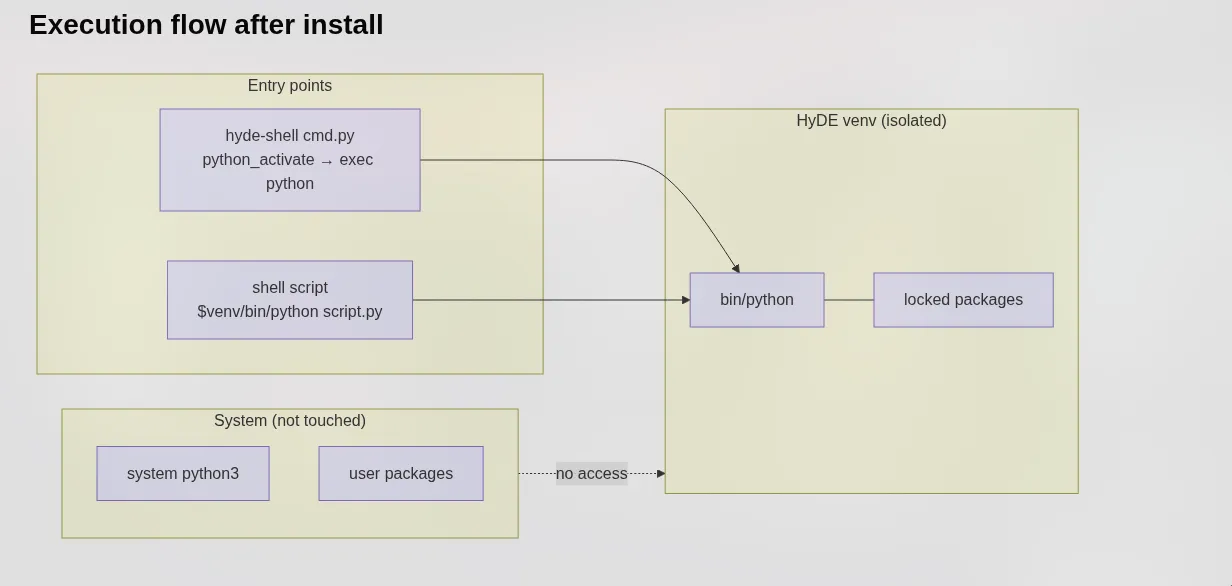
HyDE scripts reach the isolated environment through two entry points:
hyde-shell cmd.py— activates the venv viapython_activate, thenexecs the Python interpreter.- Shell scripts — call
$venv/bin/python script.pydirectly.
The system Python and user packages are never accessed.
Commands
Section titled “Commands”create
Section titled “create”python-env createCreates the virtual environment and installs all dependencies from pyproject.toml. If a valid venv already exists, it is skipped. If a broken one is detected, it is destroyed and rebuilt automatically.
python-env syncSyncs dependencies from pyproject.toml into the existing environment. Use this after pulling HyDE updates to ensure the environment is up to date.
install
Section titled “install”python-env install <package> [package ...]Installs one or more packages into the HyDE venv using uv add. The package is added to pyproject.toml so it persists across rebuilds.
Example:
python-env install requests pillowuninstall
Section titled “uninstall”python-env uninstall <package> [package ...]Removes one or more packages from the HyDE venv using uv remove. Also removes the package from pyproject.toml.
Example:
python-env uninstall pillowdestroy
Section titled “destroy”python-env destroyRemoves the entire virtual environment directory. Does not modify pyproject.toml. Run create afterward to recreate it.
rebuild
Section titled “rebuild”python-env rebuildDestroys the virtual environment and recreates it from scratch (does create & sync in behind). Useful when the environment becomes corrupted or after a Python version change.
python-env uv [--hyde] <uv-args> ...Passes arguments directly to the underlying uv executable. Use --hyde to scope the command to HyDE’s venv and project directory.
Options:
--hyde
: Injects UV_PROJECT_ENVIRONMENT and --project so the raw uv command operates on HyDE’s venv. Without this flag, the command runs as a plain uv call with no HyDE context.
Examples:
# List installed packages in HyDE's venvpython-env uv --hyde pip list
# Run uv tree scoped to the HyDE projectpython-env uv --hyde tree
Optional Dependencies
Section titled “Optional Dependencies”Some HyDE features ship as optional dependency groups in pyproject.toml. These are not installed by default to keep the environment lean.
Available extras
Section titled “Available extras”| Extra | Packages | When to install |
|---|---|---|
amd |
pyamdgpuinfo |
AMD GPU monitoring widgets |
Installing an extra
Section titled “Installing an extra”Use the uv subcommand with --extra:
python-env uv --hyde sync --extra amdThis installs only the packages declared under [project.optional-dependencies] for that extra. It does not affect the rest of the environment.
Installing your own packages safely
Section titled “Installing your own packages safely”You can extend the HyDE venv with your own packages. The key rule is: only add packages that HyDE does not declare.
# Safe — adding a package HyDE doesn't know aboutpython-env install my-tool
# After adding, sync is automatic — no extra step needed
To keep your additions across rebuilds:
- Your packages are written to
pyproject.tomlbyuv add, so they survivesync. - A full
rebuildwill re-install everything listed inpyproject.toml, including your additions.
Environment Variables
Section titled “Environment Variables”UV_PROJECT_ENVIRONMENT
: Overrides the venv path used by uv. Set internally by python-env to $XDG_STATE_HOME/hyde/python_env.
XDG_STATE_HOME
: Base directory for the venv (default: ~/.local/state). The venv lives at $XDG_STATE_HOME/hyde/python_env.
| Path | Description |
|---|---|
$XDG_STATE_HOME/hyde/python_env/ |
Virtual environment root |
$XDG_STATE_HOME/hyde/python_env/bin/python |
Python interpreter used by HyDE scripts |
<hyde-dir>/pyproject.toml |
Dependency declarations |
<hyde-dir>/uv.lock |
Lockfile — do not edit manually |
Examples
Section titled “Examples”First-time setup:
python-env createUpdate after pulling HyDE changes:
python-env syncInstall AMD GPU support:
python-env uv --hyde sync --extra amdAdd a personal package:
python-env install python-dotenvNuke and rebuild a broken environment:
python-env rebuildInspect what is installed:
python-env uv --hyde pip list